Tutorial 5 of 7
Run a secret-sharing ceremony
Intermediate 10 min
Split a recovery code 3-of-5 on your device, name custodians, print one share card per person, test the recovery, schedule the drill and encrypt the printout.
Shamir's secret sharing splits a secret into n shares so that any k of them recover it and fewer reveal nothing. Keysmith adds the parts of a real ceremony around the Shamir Secret Sharing tool: custodians, printed cards, a recovery test and a reminder for the next drill.
1. Plan the split
Open the template Recovery key ceremony and select Vault recovery code (3 of 5).
- Shares (n) 5 and Threshold (k) 3: any three people can recover the code; two shares may be lost.
- Add a 4-byte checksum detects wrong or mixed-up shares when combining.
- Custodians: one name or role per share — Ana (finance), Ben (engineering) …
- Next recovery drill: the date appears on the dashboard timeline and in the .ics reminders.
The template uses the demo secret correct horse battery staple and keeps it in the project. For a real ceremony untick Save secret test values in the project, type the real code and keep the tab offline if you like: splitting runs on this device.
2. Split and test
Press Split and test recovery. Keysmith splits locally with crypto.getRandomValues, then immediately combines three shares spread across the set (Recovery was tested automatically with shares 1, 3, 5.). The findings say Any 3 of 5 shares recover the secret; up to 2 shares may be lost. and A recovery test with 3 shares reproduced the secret.
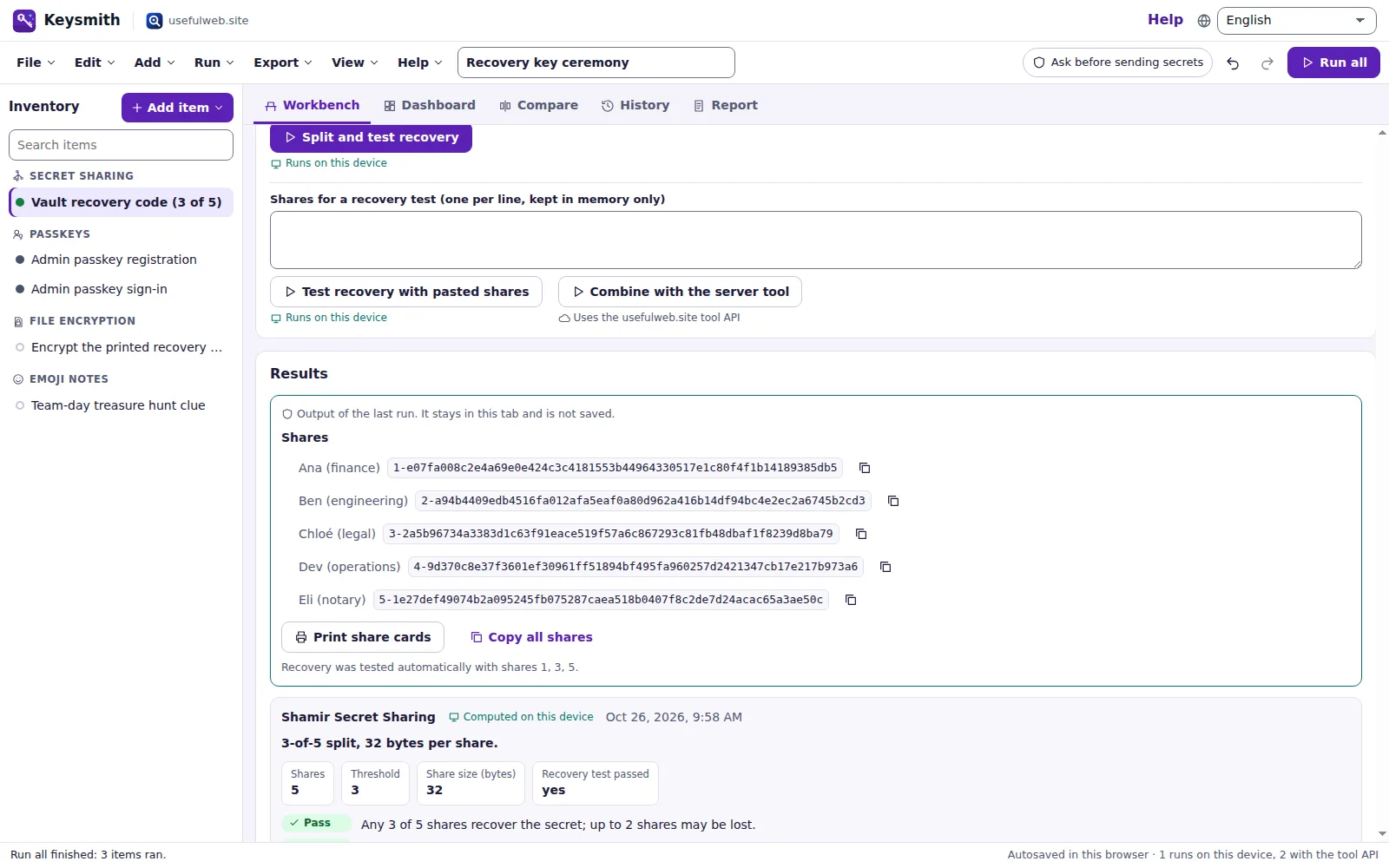
The shares are shown once, next to the custodian names, with copy buttons. They are never saved.
3. Print the share cards
Print share cards opens the print dialog with one page per custodian: share number, custodian, the plan (any 3 of 5 shares), the share itself in large monospace and recovery instructions. Choose Save as PDF or a printer. The printout contains no other share.
4. Test a recovery later
Paste any three shares into Shares for a recovery test (one per line, kept in memory only) and press Test recovery with pasted shares (on this device) or Combine with the server tool (the Shamir Secret Sharing tool; Keysmith asks first because the shares are secret). Both show the recovered secret and record a pass or fail finding. With fewer than three shares the run reports that the plan needs three.
5. Encrypt the printout
The item Encrypt the printed recovery sheet is a File encryption job. Choose the PDF of the share cards, enter a long Passphrase and press Run on this device. Keysmith encrypts with AES-256-GCM and PBKDF2-SHA-256 (600,000 iterations) in the File Encryption Studio's UWFE format and offers the .uwenc download. Cross-check with the server tool decrypts that file with the File Encryption Studio on the server and confirms identical bytes — an independent check of the format (it asks first, because it sends the file and the passphrase).
To open a .uwenc file again, drop it onto Keysmith: a decrypt job is created for it.
Ready to try it?