Tutorial 4 of 7
Password policy lab
Intermediate 10 min
Set an entropy target, generate samples on your device, race real-looking candidates, check them against known breaches and compare password hashing settings with the OWASP recommendations.
Open the template Password policy review. It has two Password policy items and two Password hashing (KDF) items.
1. Generate under a policy
Select Staff accounts: 20 random characters. The policy says Random password, Length 20, all four Character sets, At least one of each set, and Entropy target (bits) 80.
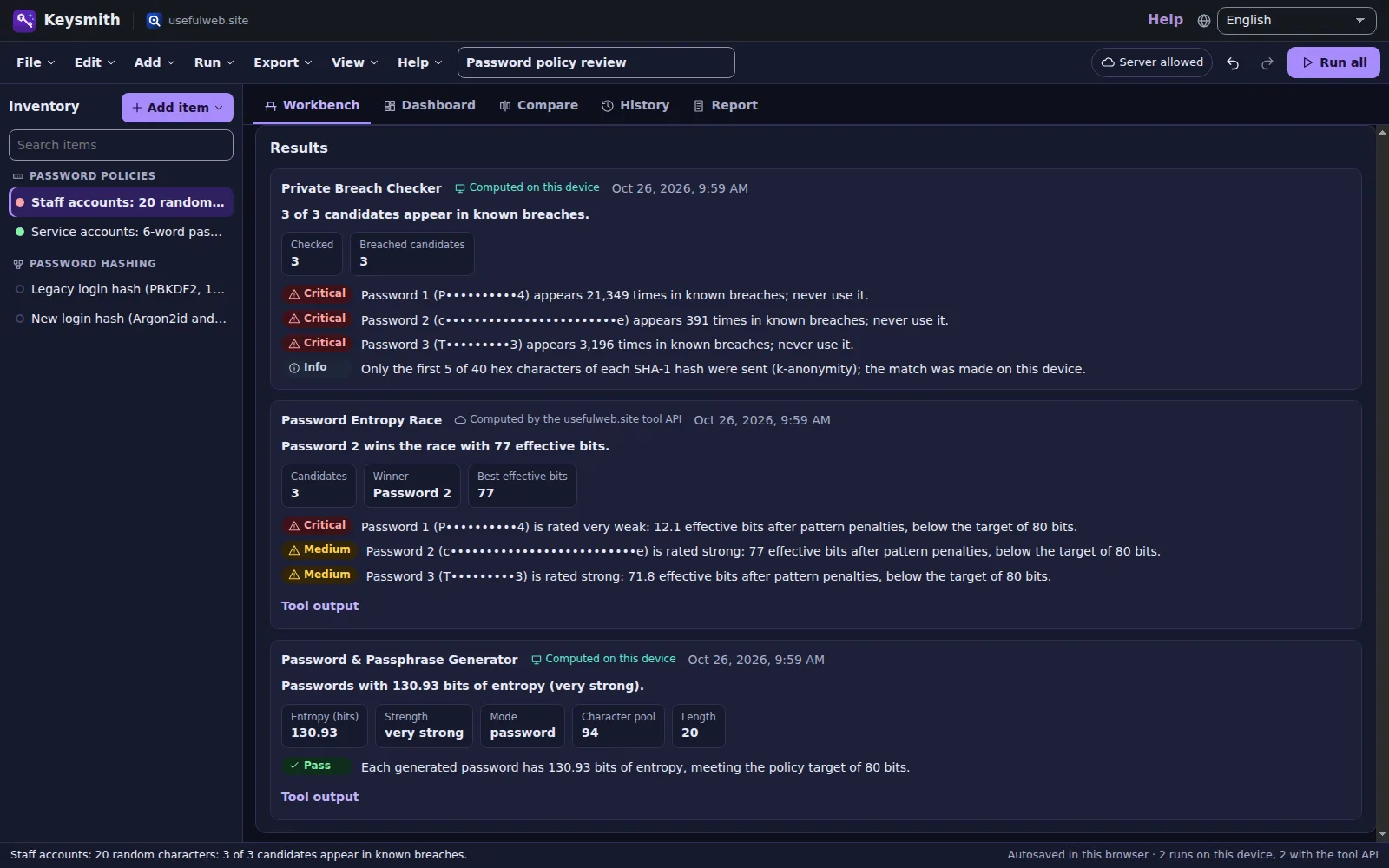
Press Generate samples. The chip says Device or server, depending on the options: random passwords are generated on this device with crypto.getRandomValues; passphrases come from the server tool's 2,048-word list. The result card of the Password & Passphrase Generator shows 130.93 bits of entropy (very strong) — the exact entropy with the "one of each set" rule — and the finding meeting the policy target of 80 bits. The samples appear above it in a box marked Output of the last run. It stays in this tab and is not saved.
Switch Policy type to Passphrase (word list) on the second item to compare: six words give about 66 bits plus a little for the digit and capitalisation.
2. Race the candidates
Candidates to test holds look-alikes of what people really choose: P@ssw0rd2024, correct horse battery staple, Tr0ub4dor&3. Press Race the candidates and confirm the dialog (the candidates go to the Password Entropy Race on the server).
The race subtracts pattern penalties (l33t substitutions, years, dictionary words, keyboard walks). In this example Password 2 wins the race with 77 effective bits; Password 1 drops to about 12 effective bits and is rated very weak. Every candidate below your target becomes a finding.
3. Check for breaches
Check candidates for breaches runs on this device: each candidate is hashed with SHA-1 locally, only the first 5 hex characters go to the Private Breach Checker, and the returned suffixes are compared here. All three classic examples appear in the Have I Been Pwned corpus — critical findings that say never use it. The numbers come live from the breach data and change over time.
4. Compare password hashing
Select Legacy login hash (PBKDF2, 10,000 iterations) and press Derive and compare. PBKDF2 runs on this device; the finding says that 10,000 iterations are below the OWASP recommendation of 600,000 for PBKDF2-HMAC-SHA-256.
The item New login hash (Argon2id and scrypt) compares Argon2id (19 MiB, t = 2), scrypt (N = 2^17) and PBKDF2 with the OWASP values. Argon2id and scrypt run on the server, so Keysmith asks before sending the test password. The Derived keys table shows each key and the time it took — on this device for PBKDF2, one server request for the server functions.
Use Compare to put the legacy and the new setting side by side.
Tips
- Raise the Entropy target (bits) for admin accounts; the generator and the race are flagged against it.
- Random salt (16 bytes) fills a fresh salt for KDF experiments.
- Never type passwords you use into any tool — use look-alikes.
Ready to try it?